
Drum roll, please! As an enthusiastic music producer or a die-hard fan of electronic dance music, break out your headphones and get ready to dive deep into the realm of Dubstep.
Welcome to Dubstep Maker: The Software & Video Tutorial You Need, your ultimate guide to creating bone-rattling bass drops from scratch.
It’s time to unveil those groundbreaking beats that are throbbing inside you to disrupt the airwaves.
Today, I will walk you through top-rated software and outstanding video tutorials tailored just for you.
Whether you’re new on this road or have been fine-tuning your skills, this journey will take you closer to mastering the art of dubstep creation.
Let’s turn your world into a dubstep arena – beats by beats, loops by loops! Aimed at being informative yet simple enough for all my fellow US readers, be ready to break the barriers and make the bass drop with a bang!
Table of Contents
What is a Dubstep Maker?
A Dubstep Maker is a software or tool that allows users to create and produce dubstep music.
With a Dubstep Maker, you can create unique and intricate basslines, drum patterns, and sound effects to compose your dubstep tracks.
These tools often come with a wide range of pre-loaded sounds, samples, and synthesizers that can be manipulated and combined to create the signature heavy bass and electronic sound characteristic of dubstep music.
Some popular Dubstep Maker software includes Ableton Live, FL Studio, and Native Instruments Massive.
Functionality & Features
What’s inside a Dubstep Maker toolbox? Let’s zoom in and unravel its core features!
- Seamless Beat Production
The foundation of any sound dubstep track lies in its beat patterns. With hundreds of pre-loaded drum kits and options for custom beat creation, “the beat-making” element is intuitive.
- Synth and Oscillator Tools
Have you ever wondered about the source of those grimy growls & robotic-style sounds unique to dubstep?
Synthesizers or ‘synths’ generate these electronic sounds with adjustable oscillators for pitch control.
- Filters & Modulation Controls
Ideal for contouring and shaping your sound output. Create pitch variations with Low-Frequency Oscillators (LFOs) or apply effect filters such as distortion or echo to enhance your track quality further.
- Sampling Abilities
This feature allows you to incorporate different audio samples into your projects.
Merge vocals from your favorite tracks or experiment with different instrumental sounds; it’s all up for grabs!
Thus, a Dubstep Maker embodies these fantastic features and is an all-in-one studio that fits snugly into your computer system.
It arms you with an extensive toolkit that enables techno-magic at your fingertips.
With such powerful capabilities, quite literally a click away, it’s no wonder why Dubstep Makers have become the preferred choice for many music enthusiasts worldwide.
Also Read: B Major: The Scale And Chords [Guide To This Bold & Beautiful Key]
Setting Up Your Dubstep Maker Software

Setting up your Dubstep Maker software is a crucial first step in your journey toward creating electronic masterpieces.
The process is relatively straightforward and doesn’t have to be daunting.
Downloading Your Software
Countless dubstep maker software is available online, such as FL Studio, Ableton Live, or Serum.
Choose one that aligns with your needs, budget, and skills, then hit the download button on the product website.
Installing the Software
Most software follows a similar installation process that includes running a .exe or .dmg file and following the instructions provided in the setup wizard.
Always opt for custom installation and carefully read through each agreement to avoid installing unnecessary third-party products.
Setting Up Desired Preferences
Once the installation is completed, open up the software to explore its interface and adjust settings.
These include audio settings, MIDI settings, interface themes, and other options based on your preference and system capabilities.
System Requirements & Plugins
Always check for system requirements before downloading any software to prevent compatibility issues.
Most professional tools require a 64-bit operating system, a robust CPU, and sufficient disk storage.
Additional plugins, drivers, or samples may also be required – depending on the features you intend to use.
Refer to your chosen software’s user manual or online community forums for specific troubleshooting guidelines.
It takes time to get accustomed to all these new buttons and knobs, but once you do – it’s all about crafting those lethal basslines and groovy drum patterns!
With practice and dedication, I assure you – you’ll be banging out tracks that would make even Skrillex raise an eyebrow.
Also Read: 13 Best Power Conditioners For Superior Protection [Buying Guide]
the Interface of Your Dubstep Maker Software
To unlock the full potential of your Dubstep Maker, it is crucial to get familiar with and understand its user interface (UI).
So, let’s take a deep dive into the critical aspects of the software interface that you need to navigate efficiently.
The Dashboard
Upon opening your software, you’ll be greeted by the Dashboard and the Home Screen.
This is where all primary operations begin. It usually includes options like ‘Start A New Project,’ ‘Open Saved Projects,’ ‘Settings,’ or direct links to tutorial resources.
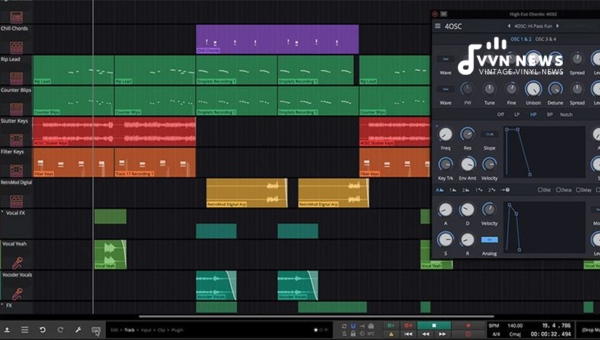
Project Area – The Digital Sound Workstation (DSW)
When you begin a new project or open an existing one, you’ll see the main workspace, commonly called your Digital Sound Workstation.
Here’s where your creativity finds shape: composing beats, designing sounds, adding effects – everything happens in this space!
Components of DSW:
Tracklist:
Located typically on the left side, it lists down all separate tracks used in your project vertically.
Timelines:
This horizontal grid represents the time during your composition when specific beats and patterns are placed.
Mixing Console:
Located at the bottom or on a separate tab, it consists of volume sliders and effect knobs representing each track to control their tones & effects.
Effects Panel:
This is where you’ll find numerous tools for sound modulation and voiceover effects like reverb, echo, distortion, etc.
The Browser
This usually occupies a panel beside or below the DSW. From here, you can browse through multiple sound samples and drag them directly onto your timeline in DSW.
Essential Elements:
- Drum Kits: Pre-set beat sequences ready for use.
- Synths: Variety of synthesized instrumental sounds.
- Effects: Ready-to-use preloaded effects to be applied on tracks.
Transport Controls
Like traditional music players, these include Play, Pause, and Record buttons and a BPM (Beats Per Minute) control feature. It might also display the song’s total time scale and your current position within the composition.
One such excellent Dubstep Maker with an incredibly user-friendly interface is Ableton Live 10.
With a balance of simplicity and sophistication, Ableton caters to amateur and professional creators alike!
Remember that while every software has its unique layout and design ethos, most stick to this conventional setup.
It may seem challenging at first glance, but fear not! Give yourself some time, start playing with the tools available, and soon, you’ll witness your creations come alive in sync with your imagination via your Dubstep Maker.
Also Read: How Much Should You Charge For Music Lessons? [Fair Rates Guide]
Creating Your First Bassline in Your Dubstep Maker Software

Crafting that first heavy bassline might appear as a daunting task. But, with the right dubstep maker, it’s an exciting journey of sound exploration.
Below are detailed steps and tips to help your bass thump and growl while ensuring your pathway to killer basslines is as smooth as possible.
the Basics
Listen closely to popular dubstep tracks and identify their unique bass patterns.
Getting comfortable with their texture and rhythm helps create a solid groundwork for your compositions.
Choose Your Synth
Once you have grasped the subtleties of different basslines, fire up your software.
Pick a synth that best aligns with your vision for the track from the wide range available.
Also Read: 22 Best MIDI Controller Buying Guide [Choose The Right Gear]
Setting Up Oscillators
Most synths come with two or more built-in oscillators, which shape the final output of our synth sound.
Begin by selecting ‘sine wave’, which gives a pure tone great for setting up basic sub-bass.
Basic Sound Design
Now for some fun! Play around with modifying parameters such as pitch, distortion, or cut-off filters applied to the chosen waveforms.
This process, known as ‘tweaking,’ will make your first basic bassline sound like a top-notch production.
Deck Up With Effects
Once satisfied with its basic structure, spruce up your creation by adding effects like EQ or saturation.
Be mindful during this step; over-processing can deter rather than enhance your masterwork!
Creating a bassline is the equivalent of painting directly onto a canvas, and your dubstep maker software is a palette full of endless possibilities.
Also Read: 24 Best Metal Guitars Guide To Amps, Strings, & Pickups
Crafting Unique Melodies in Your Dubstep Maker Software

Delving into the heart of dubstep making, it’s time to explore the realm of melodies.
Dubstep is categorical about its unique sound but does not create boundaries for your creativity.
That’s the beauty of this genre—it allows room to experiment, to take up different paths, and ultimately bring forth your distinctive style.
Know Your Notes & Scales
A melody in a dubstep song often culminates from a scale or a series of notes played in an order.
Blues, pentatonic, or chromatic – each scale renders a distinct vibe to your track.
Play with Synths
Synthesizers are a wonderful element in designing diverse melodic sounds. Built into your software are countless synth types like wavetable synths or digital synths that produce unique sounds suiting varied styles.
Choose from an impressive array of built-in plugins, such as Serum or Massive, to help create a dynamic sound palette.
Layer Your Melodies
There are no hard and fast rules that one melody translates into one track.
Layer several pieces together; assign different instrumental sounds or synth effects, producing intriguing layers that add depth and substance to the overall arrangement.
Effects and Modulation
Use the power of modulation effects. They can morph your simple sound waves into complex ones.
This trick can quickly transform basic melodies and rhythms into professional-sounding tracks by manipulating frequency, amplitude, phase, and other properties.
Each step unravels how melodies play a significant role in how we perceive music, inevitably becoming the backbone of a track.
It’s an adventure into a sonic world that provides layers to your composition. Crafting melodies in your dubstep software encourages you to push boundaries and challenge conventions to curate original sounds.
So, play with notes and experiment with synths, layers, and effects; each is a stepping stone towards mastering the melody game.
Also Read: Chords In E Major [Master The Guitar With This Guide]
Mixing and Mastering Your Dubstep Track
One of the crucial stages that could make or break your dubstep track is the process of mixing and mastering.
This part breathes life into your music, creating a balanced, impactful, and professional-sounding track.
the Importance
Before we dive into how to mix and master effectively, it’s essential to shed light on what these terms mean for a track.
Mixing is positioning and blending all individual sounds within your project – beat patterns or synth melodies – so that they harmoniously function together as a single entity.
On the other hand, mastering is about the final touches, which involve raising volume levels, adding polish to the mix, and ensuring consistency among different audio systems or platforms.
Mixing Techniques
Let’s kick-start our plunge into the core elements of mixing:
- Balancing Levels: Maintaining an equilibrium between all sounds in your dubstep mix. A well-coordinated balance prevents any one sound from overpowering others.
- Panning: As simple as it may seem, playing around with stereo space can add dimension to your tracks. Panning various elements (like drum synths) left or right can create spaciousness and interest.
- Equalization (EQ): EQ tailors frequencies within an audio signal. Ensure you’re not amplifying clashing frequencies; treat them with broad strokes in EQ for a cleaner mix.
- Compression: Compression levels out extreme variations in volume by reducing dynamic range, making tracks more punchy.
Mastering Insights
Once you’ve got your mix sounding like a professional-grade dubstep goldmine, let’s venture into mastering:
- Adjust Volume Loudness: The crucial job here involves bringing volumes up to standard playback level aligned with commercial tracks.
- Equalization: At this stage, EQ helps make subtle tweaks, polishing further sound frequencies and adding clarity.
- Limiting: A limiter catches any unintended volume peaks that could cause distortion. Set a limit on your track’s maximum volume to avoid these clashes.
The essence of mastering is to solidify the sonic quality of the mix, ensuring it’s ready for multiple platforms – from club sound systems to regular headphones.
Mixing and mastering Dubstep Maker software could be daunting initially, but with persistent practice, you will achieve that perfect bass-heavy drop you envisioned! Be patient, each refinement adds up over time.
Boldly experiment with these techniques, and soon, you’ll be carving out dubstep masterpieces that truly stand out! You’re not just making music, you’re crafting an experience.
Also Read: G Diminished Triad [Guide To Unique Guitar Chords]
Best Dubstep Maker Software of 2021
The year 2021 has witnessed some phenomenal Dubstep Maker software releases that have redefined music production standards.
Let’s look at three of the best tools available, evaluated on user-friendly interfaces, expansive sound libraries, robust features, and excellent customer reviews.
1. FL Studio
Known as Fruity Loops in its infant days, FL Studio has matured into one of the world’s most sought-after music production software.
Beginners and industry professionals have embraced this powerful tool for its simplicity and intuitive interface.
Features:
- A vast array of synth plugins, such as Sytrus and Harmor, are crafted explicitly for creating complex growls and harmonic layering, quintessential to dubstep.
- Piano roll – arguably one of the best in any DAW (Digital Audio Workstation) for crafting those pulsating tunes.
- FL Studio’s ‘Patcher’ tool allows advanced users to create complex instrument layers and effect chains.
- “Edison,” an integrated audio editor tool that supports sample slicing, tuning, and time-stretching capabilities.
2. Ableton Live
Regarding flexibility in live performances or navigating through workflow quickly, Ableton Live stands out.
It is well-reputed among veteran dubstep producers for its superior automation controls.
Features:
- Two distinctly styled workflows – The traditional ‘Arrangement View’ is timeline-based while ‘Session View’ offers a more immersive control over playing live music.
- The extensive sound library includes multiple high-quality samplers like Simpler/Sampler and several performance-ready effects.
- The ‘Warp’ feature allows manipulation of audio samples on various levels, including pitch, tempo, etc.
- ‘Link’ feature – for syncing multiple devices and playing together in perfect harmony.
3. Logic Pro X
Logic Pro X has become a favored choice among Mac users for its stable workflow.
It shines with seamless integration with Apple’s hardware and stuns with an exceptional loop library.
Features:
- The Alchemy synth plugin bundled with the software is a powerhouse for creating dubstep basslines.
- Logic’s ‘Smart Controls’ allow on-the-fly adjustments of multiple plugin parameters.
- The ‘Drummer’ feature bestows high-quality drum tracks laid down by professional players according to your instructions.
- It offers an impressive suite of mastering plugins, bringing those final touches to your track.
While FL Studio boasts a commendable all-around package, Ableton focuses more on live performances, and Logic Pro X is an impeccable choice for Mac users.
Ultimately, your path will lead you closer to making irresistible dubstep tracks from scratch! Set yourself up, and let’s get grooving!
FAQs About Dubstep Maker
What exactly is Dubstep Music?
Dubstep is a genre of electronic dance music known for its heavy bass, sparse rhythmic structures, and complex patterns.
Is there any free Dubstep Maker software available?
Yes, some free Dubstep Maker software options include Tracktion T7 and Cakewalk by BandLab.
Can I use Dubstep Maker software if I’m a beginner?
Absolutely! Several user-friendly platforms are explicitly designed for beginners, such as FL Studio.
Can I use the beats created with the software for my tracks?
Yes! Ownership rights of the output depend on the terms and conditions of the specific software. Most software often allows full music rights you make.
Are there tutorials available to guide me in using a Dubstep Maker?
Certainly! There are numerous video tutorials accessible online on platforms like YouTube that break down all the features of your chosen software.
Conclusion
Dubstep Maker provides endless possibilities, offering comprehensive features to craft your signature sound.
You can confidently explore music production with an understanding of its operation and application described in this guide.
Start by installing your preferred software, understanding its interface, composing your beats and melodies, and mastering your track.
Whether you’re a beginner or a pro, there’s always something new to learn. So why wait? Dive in now and let the music begin – because your rhythm needs no permission!