
We’re already in 2023, and the digital audio workstation (DAW) scene has never been more exciting.
As I venture into the expansive universe of sound and music production in my daily life, I can’t help but be fascinated by how far we’ve come.
Today, I will share my insights on the 15 best DAW in 2023 that transform how we create and experience music.
Whether you’re a seasoned producer or a fledgling sound designer just starting, having the right DAW at your fingertips is critical to bringing your sonic visions to life.
With so many exceptional DAWs, it can be hard to pick just one as they all offer unique features and capabilities tailored for different musical styles and workflows.
Table of Contents
Introduction to Digital Audio Workstations (DAWs)
A Digital Audio Workstation (DAW) is a tool that significantly reshaped the music industry in contemporary times. But what is a DAW, and how has its evolution influenced modern music production?
What Is a DAW?
A DAW is a computer program for editing, recording, mixing, and mastering audio files. A DAW allows you to record your instrument or vocals, add effects, mix your sounds, and finally master your track ready for release. Take this as your music studio.
It is an intermediary interface, allowing users to manipulate sounds to produce musical magic easily. Capabilities may vary across different DAWs due to their unique features.
Some offer extensive MIDI sequencing tools with multi-track recording capability; others focus on live performances with real-time effects and DJ-style features.
Evolution and Relevance of DAWs in Modern Music Production
The digitalization of music has immensely transformed the landscape of music production.
Back in the days before DAWs, professional audio recording was quite expensive – requiring large amounts of hardware equipment such as mixing desks, tape machines, and racks full of processors and effects.
From those extensive setups in the 70s and 80s to today’s sleek smartphone apps for creating beats on the go, it couldn’t have been possible without DAWs.
Considering this trend from past to current context establishes how essential these platforms have become for any form of sound production, be it creating mainstream music tracks or podcasts or even designing sound elements for games or films.
As we enter 2023, this democratization continues as barriers to entry keep diminishing while technological advancements expand these platforms’ creative possibilities.
From being within reach of professionals, only today’s DAW has entered educators’ hands, teaching future musicians, recordists working from home studios, or even artists creating music on their laptops.
Today’s scene screams loud about how intensely deep-rooted DAWs have become in shaping the soundscape we consume daily on our playlists.
That’s precisely why getting a firm grip on using a well-suited platform would elevate your creative experience dramatically.
How do DAWs Work?

The core of any good sound production is the middleware that merges the complexities of technical know-how with the artist’s creative fluidity – The Digital Audio Workstations.
To leverage their potential to the fullest, let’s break down for a better understanding of their functionalities and a demonstration of setting and using these platforms.
Basic Functionalities of a DAW
A typical DAW serves multiple functions, which can be broadly categorized as follows:
- Recording: One of the DAW’s most elemental capabilities is capturing sounds. This could be through attached microphones, direct imputes from instruments, or even drawing MIDI notes onto a grid to create melodies and beats.
- Editing: Post recording, DAW facilitates modifying these captured audios by cropping, moving around timeframes, adjusting volumes, or gating out unwanted noise for refining your tracks much more efficiently.
- Mixing and Mastering: Balancing multiple tracks to make them sound good together, also known as mixing, is one critical aspect where DAWs come in handy, allowing manipulation of track sound using EQs, compressors, and other effects. The final process, mastering, ensures your song can stand up sonically to other commercial releases.
- MIDI Sequencing: Many DAWs provide tools to compose music with virtual instruments – also known as MIDI (Musical Instrument Digital Interface) sequencing – essentially bridging hardware and software instruments for creating rich tonal textures.
Demonstration of How To Set and Use a Simple DAW
Noteworthy here is that each DAW will have its unique setup based on its software layout and features, but below are generalized steps covering essential elements almost every platform would require:
Installation
Download your chosen DAW according to your operating system (Windows/Mac) and run the installation setup from their official site.
Upon completion, launch your program.
Audio Setup
Go to the Preferences / Settings section under File / Options menus according to your selected software type.
Here, you’ll find audio settings, usually under an ‘Audio’ or ‘ASIO’ tab, where you can select your audio interface or built-in sound card output, depending upon what you have available.
Save Preferences once done.
Track Creation
On the main window, usually towards the left side, click on the button/icon having written “Add Track” / “+ Track” OR go to ‘Tracks’ in the menu bar at the top, choosing ‘Add new.’
A dialogue box will generally appear, giving options about track type (MIDI/audio), quantity, etc., filled appropriately according to the objective.
Record or Import Audio
On nearly every fresh track created, there would be an arm recording button; click this followed by hitting the main record button, frequently positioned around play & stop buttons on the transport bar at the central bottom.
Alternatively, use the drag-drop/import options in the ‘File’ menu if importing existing audio files.
Mixing Process
Each track holds volume & pan controls beside them; balance tracks’ volume levels such that no clip/red light appears on the master level meter, usually at the far right end, while pan control decides whether the sound comes more from the left/right speaker, collectively forming a stereo image of the mix.
Export Final Mixdown
Usually found under File>Export, where various format options (.mp3/.wav, etc.) along with resolution depth & sample rate choices are offered, fill according to the final output requirement by clicking export when done.
Fill in information if asked for file name/location. Finally, hit save, completing the process.
Also Read: What Is Audio Clipping? [Digital Clipping Vs Analog Clipping]
Functions of a Digital Audio Workstation
A Digital Audio Workstation (DAW) is a powerhouse of ease and creativity.
I want to discuss its core utilities, from accomplishing your audio recording requirements and helping you mix and master to facilitating some creative ventures.
Recording audio with a DAW
Recording is perhaps the most basic function that every decent DAW should nail well.
This feature is what’s behind the transformation it brought into music production.
Various DAWs will offer different facilities in their recording capabilities. Some standard functionalities include multi-track recording, non-destructive editing, real-time effects processing, MIDI sequencing, etc.
For instance, when recording vocals or an instrument directly into the DAW, the recorded sound gets translated into digital data for manipulation and later reproduction in whatever form you like.
Capacities of tracks to record simultaneously vary across different platforms. Multi-track capabilities establish how many such recordings can be assembled and played back in sync.
Mixing and Mastering process using a DAW
In layman’s terms, Mixing is all about shaping each piece of your track puzzle until they fit together just right.
Controlling volume levels of various tracks, positioning sounds between speakers to design the depth or width of soundscape, decision-making on emphasizing or deemphasizing certain elements, or adding effects like reverb or delay are all part of this mammoth task.
Every DAW would provide tools for accomplishing such tasks and more.
Mastering, on the other hand, is the very final process before you distribute your track.
It ensures uniformity and consistency in sound when played on varied equipment by fine-tuning aspects related to overall tonality equalization or dynamic range leveling across different tracks in an album, maintaining harmony between them.
Other creative uses for a DAW
Looking beyond the boundaries of conventional utilities, DAWs can serve as beautiful creative spaces for sound designers, podcasters, songwriters, or even educators. These could be used:
- Sound Design and Foley – For a Sound Designer, DAWs serve as the canvas to create ambiances and sounds in ways unimagined! On the other hand, Foley artists may use this to recreate everyday sound effects, enhancing film or video’s audio quality.
- Podcast Creation – You may use a DAW for recording and editing your podcasts: interviewing guests remotely, balancing dialogues, adding intro-outro jingles – it could all be done here!
- Teaching Students – For educators teaching music production or any recording-related subject, demonstrating lessons on a DAW is a great way of making students understand the technicalities of their computers.
- Songwriting & Demo Production – For songwriters, DAWs could provide a space to jot down moments of their creativity quickly — scribbling ideas or creating entire demos!
Digital Workstations are much more than music-producing platforms. What you can do with this is boundless.
Remember one thing when choosing your ideal tool: always keep your usage in mind, along with how comfortable you are with it.
Emerge and create some soundscapes that will touch souls in unimaginable ways possible.
Also Read: What Is Phantom Power? 2026 [The Purpose & Why Do I Need It?]
15 Best DAW In 2023

Let’s embark on this captivating journey where we delve into a comprehensive list of what I believe to be the 15 best DAWs in 2023.
Each one holds its unique charm and offers a diverse range of functionalities tailored to cater to different kinds of users, from beginner musicians and podcast creators to experienced mixing engineer professionals.
Here’s your roadmap to navigating through the saturated digital audio workstations market available today.
1. Ableton Live
No list of best DAWs would be complete without a mention of Ableton Live. Considered a staple in electronic music, it’s praised for its efficient workflow that promotes ease and creativity.
Unlike traditional linear DAWs, Ableton offers an out-of-the-box ‘Session View’ allowing real-time manipulation and improvisation of your tracks – which has won the hearts of many artists.
Key Features
- Live Performance Interface: Truly living up to its name, it offers an interactive stage view while performing in real-time.
- Multi-track Audio Recording: You can record and arrange music simultaneously, giving you immense flexibility.
- Suite of Virtual Instruments: Ranging from synths to samplers to drum machines – it’s fully equipped!
- Max for Live: An integrated environment for building custom effects and tools inside Ableton.
All these elements come together seamlessly in Ableton, making a holistic and well-integrated toolkit.
Why It Is on the List
I’ve put Ableton Live on this list because it offers extensive functionalities for beginners and advanced users.
Whether you’re laying down tracks, performing live, manipulating audio or MIDI, or even exploring sound design or mixing tracks, Ableton has everything just right!
Additionally, their extensive collection of video tutorials delivers excellent learning resources for beginners. Coupled with an incredible user community often sharing self-created content – there’s always help around the corner!
With innovative features expanding the musical palette extensively yet maintaining a clean, user-friendly interface, Ableton Live will be one of the top Digital Audio Workstations in 2023.
Armed with these capabilities, I believe users find creative expression without any technological hindrance- truly what defines a great tool!
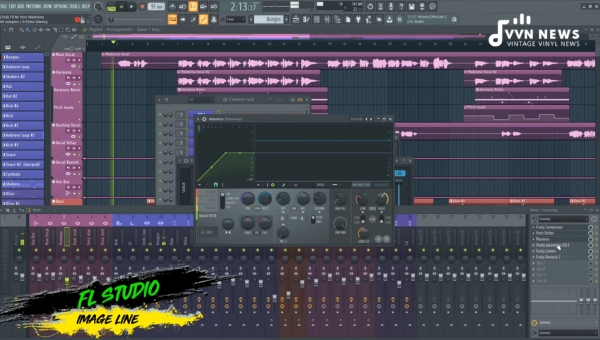
2. Image-Line FL Studio
Formerly known as FruityLoops, FL Studio by Image-Line has been in the game for over two decades.
Originally designed as a drum sequencer, it has become a comprehensive music production environment.
Key Features
- Step Sequencer – This quick audio pattern creation tool enables users to create and edit loops, which is one of the primary attractions of this DAW.
- Piano Roll – The piano roll in FL Studio is notably regarded as one of the best. Smooth and incredibly easy to use, it makes composition tasks feel effortless.
- Great Stock Plugins and Instruments – FL Studio comprises synthesizers like Sakura, representing string instrument sounds, and Harmor for additive and subtractive synthesis, a goldmine.
Why It’s On The List
FL’s popularity among electronic and hip-hop producers is a testament to its flexibility and workflow efficiency.
Its unique features, like an easy-to-navigate interface and supportive online community, make it enjoyable for producers at any level to take their first steps or execute complex projects.
3. Apple Logic Pro
Apple Logic Pro offers rich features applicable to beginners hopeful about learning the ropes quickly while offering professional composers a full-fledged recording studio functionality.
Key Features
- Flex Time – This time stretching feature lets you move parts of an audio waveform without affecting rest—perfect for correcting timing issues or changing rhythm patterns.
- Track Stacks – Create layered effects or combine multiple tracks, facilitating comping features often required in professional mixdowns.
- EXS24 Sampler – Offers an ideal means to implement digital samples in productions, allowing manipulation of pitch, filter, and amplitude envelopes.
Why It’s on the list
Logic Pro offers robust tools for songwriting, editing, and mixing – providing an overall stable workflow through all stages of production.
Excellent synth plugins and sophisticated scoring features enhance its credibility further, making it perfect for Apple product users seeking top-tier DAW performance right on their Macs!
4. Steinberg Cubase
Known as one of the first DAWs in history, Steinberg Cubase has evolved immensely, maintaining its status as a highly functional DAW- catering to choices ranging from amateur musicians to professional recording engineers.
Key Features
- VariAudio – An incredible tool offering MIDI-style editing features for monophonic vocal tracks—an auto-tune-esque plugin giving freedom to manipulate melody lines precisely.
- MixConsole History – Conveniently provides undo steps in your mixer window during large projects requiring frequent adjustments.
- Chord Pads – A fantastic feature allowing users a hard time delving deep into music theory; these pads can generate chord progressions dynamically, simplifying the song composition process!
Why It’s on the list
Cubase’s vast collection of VST instruments/effects plugins and advanced editing/mixing capabilities firmly place it among the top DAWs.
The MixConsole approximates the physical mixer board experience and is thus appreciated by reputed sound engineers globally!
5. PreSonus Studio One
PreSonus Studio One has quickly emerged as a significant contender in the DAW space.
Its advanced feature set, easy-to-navigate interface, and seamless DAW integration have made quite a buzz.
From beginners discovering music production to professionals mastering multiple tracks – it serves all excellently.
Key Features
- Efficient Single Window Workflow: Traversing in and out of multiple windows while producing can be a bottleneck. To solve this, Studio One proposes an efficient single-window workflow system where everything is neatly organized.
- Drag-and-Drop Functionality: This feature ensures a quick and smooth placement of effects, instruments, samples & plug-ins onto tracks. You select what you want and drop it off where needed.
- Robust Audio Engine: Presonus’s high-performance audio engine delivers unparalleled power to handle heavy processing tasks without lags or hiccups.
- Integrated Melodyne Tuning Software: This feature takes your vocal or instrument recordings to another level by professionally adjusting pitches.
- Mix Compatibility with Other DAWs: Transferring mix from one DAW to another can be tricky. But with this feature – users can effortlessly import/export tracks from other popular DAWs, maintaining full mix compatibility.
Why it is on the list
The ease of use and robust features make Studio One an excellent choice for beginners and advanced users.
With the impressive native effects and instruments provided in the library, it allows extensive experimentation for creative audios – making it worthy of our top 15 list!
6. Cockos Reaper 6
A relatively new player in the arena – Cockos Reaper 6 stands out for its deep customization abilities and appealing price point.
Key Features
- Efficient CPU Usage: Reaper 6 considerably shines regarding CPU management! Its ability to handle large projects without impacting your computer’s performance is commendable.
- Customizable Interface: While many DAWs have fixed interfaces, Reaper 6 allows users immense flexibility in setting up their workspace arrangement based on personal requirements.
- Vast Plugin Suite: It immediately includes a broad range of stock plugins instead of forcing users into proprietary formats. Let production creativity flow sky-high!
Why it is on the list
Cockos Reaper 6 secures its place on our list due to its customization capabilities married beautifully with resource efficiency.
Plus, that budget-friendly tag deserves a special mention!
7. Reason Studios Reason
Reason Studios‘ Reason sets itself apart, offering a unique approach to music creation using clickable virtual gear models emulating studio equipment look & feel while producing music online.
Key Features
- Modular Rack Concept: A literal game-changer! The digital rack can be customized extensively, infusing virtually limitless possibilities around sound design and routing setup.
- Massive Collection of Instruments & Effects: Loaded up-front are endless options between synthesizers, samplers, and drum machines embedded that strive for a creative sound-making journey right off the start!
Why it is on the list
Reason features here due to its refreshing modular-rack orientation, making production more immersive & intuitive when compared to conventional channel-strip layouts used by most platforms.
8. Bitwig Studio
As a relative newcomer in the DAW game, Bitwig offers unique functionalities that give it an edge over many other systems.
Key Features
- Unified Modulation System: This feature lets you modulate any device parameter, including nested devices & plug-ins. Intriguing right?
- An Intuitive GUI Interface: It allows handling multiple projects at once! Tailor-made sketching pads would enable you to spread your ideas nicely within this workspace!
Why It’s On The List
Bitwig Studio hits the sweet spot between complexity and intuitiveness – making it suitable for beginners and seasoned professionals.
Its innovative modulation system makes creating effects chains simple yet immensely potent.
Moreover, its ability to handle multiple projects simultaneously incredibly smoothes workflow operations.
9. Apple GarageBand
Apple GarageBand is a fantastic DAW – specially designed for Apple device users.
Key Features
- Live Loops: This adds an effortless digital DJ vibe, letting you create music by triggering cell-based loops & audio samples.
- Extensive Sound Library: This library provides numerous preset options, including keyboards, drum beats, guitar presets & more!
Why It’s on the List
Apple GarageBand easily stands out as one of the most user-friendly platforms around!
Besides being free-of-cost for Mac users, it also ticks all boxes, offering plenty of pre-recorded loops, synths, and preset interfaces, easing newbies into learning basics before diving deeper into intricate music production setups.
10. Acoustica Mixcraft
Regarding accessibility, affordability, and simplicity, Acoustica Mixcraft is undoubtedly one of the best DAWs.
It’s an excellent choice for beginners looking to start their music production journey without getting overwhelmed by excessive features they might not be ready to dive into.
Key Features
- User-friendly Interface: A straightforward and intuitive interface that’s easy for newcomers to navigate.
- Multi-Track Recording: Offers up to 192kHz recording with 64-bit technology.
- Broad Range of Plugins: Provides various instruments and effects plugins, saving you from the additional cost of expensive add-ons.
Why it is on the list
Acoustica Mixcraft stands out because of its user-friendliness and affordability. Its rich collection of standard plugins and powerful sequencing and editing capabilities make it an excellent tool for creating polished tracks on a budget.
11. Avid Pro Tools
Looking into any professional recording studio would reveal why Avid Pro Tools consistently ranks as one of the top DAWs in the market. It is revered for its advanced audio editing features and unmatched workflow efficiency.
Key Features
- Comprehensive Editing Toolset: Provides advanced precision editing, mixing, and automation tools.
- Compatible with Various Hardware: Works seamlessly with numerous MIDI controllers and digital consoles.
- Collaborative Workspace: Enables real-time collaboration with other artists and producers worldwide.
Why it is on the list
Avid Pro Tools sets industry standards for high-quality professional audio work. Its superior technical capabilities make it a vital tool in many music production studios across the globe.
12. Cakewalk by BandLab
Formerly known as SONAR before its acquisition by BandLab, Cakewalk has stood the test of time with its feature-packed offering that doesn’t compromise quality.
Key Features
- Extensive Plugin Library: Comes bundled with an array of plugins, including synths, samplers, and virtual instruments.
- Touch-Enabled Interface: Scalable UI provides optimal viewing experience across all devices and screen resolutions.
- VocalSync Technology: Enables perfect alignment between vocal parts during dubbing or double-tracking processes.
Why it is on the list
Offered entirely free of charge since BandLab took over, this revamped version offers similar high-end DAW features without breaking the bank. Its functionality, flexibility, and robust tools have made Cakewalk a trusted choice among many musicians worldwide.
13. Cubase
Cubase needs no introduction in the world of music production. Developed by the German company Steinberg, it has consistently stayed at the forefront in delivering industry-standard audio processing and recording facilities.
Key Features
- MIDI Functionality: Cubase offers some of the most potent MIDI tools available on a DAW today.
- VST Connect SE and VST Transit: These features provide seamless online collaboration capabilities.
- Plug-ins and Virtual Instruments: Packed with various high-quality plug-ins, samples, and virtual instruments.
Why It Is on the List
You must acknowledge Cubase’s seminal role in introducing the world to VSTs (Virtual Studio Technology), without which modern music production would’ve been unthinkable.
Its powerful features and easy-to-navigate user interface make it a favorite among beginners and seasoned professionals.
14. REAPER
REAPER (Rapid Environment for Audio Production, Engineering, and Recording), developed by Cockos, has gained fame as a highly adaptable DAW tailored to different working methodologies.
One key standout aspect of REAPER is its customizable nature. Depending upon your requirements, it can be as complex or simple as you want it to be, from setting up single-track recordings to orchestrating an entire film score.
Key Features
- Adaptable Interface: You can personalize almost all elements in its GUI.
- Variety of Routing Options: Extensive routing options allow complex lineup configurations.
- Multi-format Support: It supports various digital formats without import/export hassles.
Why It Is on the List
Apart from its operational efficiency, what stands out about REAPER is its high value-for-money proposition; hence, it makes our list despite being a recent entrant into the industry compared to other long-standing contenders like Cubase or Pro Tools.
15. Audacity
A perpetual contender on ‘best-of’ lists worldwide, Audacity is probably one of the most accessible audio editing tools even non-musicians have often encountered!
Key Features
- Mastering Suite: Provides basic mastering needs – equalizing frequencies, managing dynamics & adding spatial effects.
- Support For Third-Party Plug-Ins: You’ve numerous plugins to amplify your work further.
Why It Is on the List
Despite being an open-source platform with zero cost, Audacity certainly doesn’t skimp on providing all essential editing features necessary for producing quality sounds, hence reserving its spot amongst the top-tier DAWs.
Also Read: 19 Best Audio Interfaces For Home & Studio Recording 2026
Detailed Analysis on Selecting the Right Fit
The numerous available options may be overwhelming when selecting the right Digital Audio Workstation (DAW) to suit your needs.
However, this process can become much simpler if you know what to look for. Here are some key factors you must consider before settling on a DAW:
Functionality
It would be best if you determined the most relevant functions and crucial to your working process.
Would you want something more tilted towards MIDI programming, or would something with robust audio recording features be more fitting? Certain DAWs specialize in different areas.
For example, Ableton Live is renowned for its looping and sequencing capabilities, making it ideal for electronic music producers.
User Interface
The interface of your DAW should be easy to use and intuitive.
If a software design does not align with your workflow or seems overly complicated, it might not be your best choice.
The objective here is to streamline your creative process and not stifle it.
Compatibility
Another crucial factor is compatibility with your hardware and operating system.
Investing in a Windows-exclusive DAW would be unwise if you own a Mac computer and an audio interface that only functions with macOS systems.
Also, check if your DAW supports all plug-ins (VST, AU, AAX) per your requirements.
Price
The price varies significantly among software platforms, ranging from free versions like Tracktion Waveform Free and budget-friendly ones like Reaper to high-end products including Pro Tools or Logic Pro X.
Selecting a perfect fit isn’t about jumping on popular choices but finding one that resonates best with your unique musical quests and journeys.
FAQ’s About DAW
What are 3 examples of DAW?
Some examples of popular Digital Audio Workstations (DAWs) include Ableton Live, Pro Tools, and FL Studio.
Which DAW is best for live instruments?
For recording and editing live instruments, many artists and producers swear by the flexibility and functionality of Logic Pro X.
Which DAW is most used by professionals?
Avid’s Pro Tools is a widely respected and commonly used DAW among industry professionals.
What is the most transparent DAW?
In terms of transparency, meaning a highly intuitive user interface coupled with robust features, Presonus Studio One often tops the list.
How much does a reasonable DAW cost?
Prices for premium DAWs can vary significantly based on the specific features you need. Generally speaking, you could expect to spend anywhere from $100 to several hundred dollars for a good-quality DAW software package.
Conclusion
DAWs offer many possibilities for music lovers, creators, and professional producers alike.
The ability to compose, record, edit, and mix music has never been more accessible, and it’s only set to improve as technological advancements continue to unfold.
As we’ve walked you through the best DAWs of 2023, the best DAW for you must fit your workflow comfortably while satisfying all your musical needs.
So why wait? Dive in and explore the transformative power of music production at your fingertips! Happy creating!