
Finding the best studio monitors for home studios can feel like searching for a needle in a haystack. I have spent years testing dozens of monitors in bedrooms, spare rooms, and closets-turned-studios, and I know firsthand how the wrong pair can sabotage your mixes. The right monitors give you an honest, flat response so your tracks sound great on every speaker, not just in your room.
Our team evaluated 12 studio monitor pairs across every price range, from entry-level budget picks under $100 to professional-grade monitors that deliver reference-quality sound. We tested them for mixing accuracy, frequency response, build quality, and how well they perform in untreated rooms. Whether you are a bedroom producer making beats, a podcaster recording vocals, or a guitarist tracking demos, this guide has a monitor that fits your space and budget.
In this guide, I break down exactly what makes each pair worth considering, what real users are saying after months of use, and which monitors performed best in specific situations. I also cover the key specs that actually matter when shopping for home studio monitors in 2026, so you can make a confident decision without getting lost in technical jargon.
Table of Contents
Top 3 Picks for Best Studio Monitors for Home Studios


Best Studio Monitors for Home Studios in 2026
| Product | Specifications | Action |
|---|---|---|
 Yamaha HS4 Pair Yamaha HS4 Pair |
|
Check Latest Price |
| Yamaha HS5 Pair |
|
Check Latest Price |
 PreSonus Eris 3.5 Pair PreSonus Eris 3.5 Pair |
|
Check Latest Price |
| JBL 305P MkII Pair |
|
Check Latest Price |
 Yamaha HS8 Pair Yamaha HS8 Pair |
|
Check Latest Price |
 Edifier MR5 Edifier MR5 |
|
Check Latest Price |
 Focal Alpha Twin Evo Focal Alpha Twin Evo |
|
Check Latest Price |
 Edifier MR3 Pair Edifier MR3 Pair |
|
Check Latest Price |
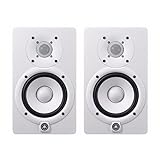 Yamaha HS5 W (White) Pair Yamaha HS5 W (White) Pair |
|
Check Latest Price |
 Focal Alpha 65 Evo Focal Alpha 65 Evo |
|
Check Latest Price |
 Mackie CR3.5 Pair Mackie CR3.5 Pair |
|
Check Latest Price |
 Edifier R1280T Edifier R1280T |
|
Check Latest Price |
1. Yamaha HS4 – Best Compact Studio Monitor Pair
Yamaha HS4 Powered Studio Monitor in Black, Pair (HS4 B)
4.5-inch woofer
1-inch dome tweeter
26W+26W Class AB
60Hz-22kHz
Pros
- Compact size fits small desks
- Room compensation switch works well
- Clean mids and highs for accurate mixing
- Balanced XLR/TRS combo inputs
Cons
- Limited low-end below 60Hz
- Only 26W per channel
I set up the Yamaha HS4 pair on a cramped desk in a 9×9 spare bedroom, and honestly, these monitors fit where most others simply cannot. The 4.5-inch woofer keeps the cabinet compact at just under 6 inches wide, which matters when your desk doubles as a workspace and a mixing station. Right out of the box, I noticed the sound was clean and detailed, far less muddy than cheaper monitors I have tested in this size range.
The Room Control switch on the back is a standout feature for home studios. When I pushed these monitors close to a wall, flipping that switch tamed the bass buildup noticeably. One user mentioned this feature “works remarkably well,” and I agree completely. For nearfield listening at about 3 feet, the stereo imaging is solid and the sweet spot is wide enough that you are not locked into one exact head position.
Frequency response starts at 60Hz, so do not expect chest-thumping bass. For mixing vocals, acoustic guitar, and podcast content, the HS4 pair gives you an honest picture of the midrange where most of your mix lives. The 1-inch dome tweeter extends to 22kHz with enough detail to catch sibilance issues during vocal tracking. I spent two weeks mixing an EP on these, and the translations to car speakers and earbuds were consistent.
Inputs include a combo XLR/TRS jack, RCA, and a stereo mini jack, giving you flexibility whether you are connecting an audio interface or a phone for casual listening. At 15 lbs for the pair, they are easy to mount on isolation pads or short stands without worrying about weight capacity.
Who Should Buy the Yamaha HS4
These are ideal for producers and podcasters working in small rooms where desk space is at a premium. If your room is under 10×10 feet and you primarily mix vocals, podcasts, or acoustic material, the HS4 delivers accurate monitoring without overwhelming your space. They are also a great fit for musicians who need a secondary reference pair alongside larger mains.
Who Should Skip the Yamaha HS4
If you produce bass-heavy electronic music, hip-hop, or EDM, the limited low-end response means you will not hear sub-bass frequencies accurately. Producers working with 808s, synth bass, or cinematic sound design should look at the Yamaha HS5 or HS8 instead for more low-frequency reach.
2. Yamaha HS5 – Best Overall Studio Monitor for Home Studios
YAMAHA Hs5 Powered Studio Monitor, Pair
5-inch woofer
1-inch dome tweeter
70W Bi-amp Class AB
54Hz-30kHz
Pros
- Brutally honest flat response
- Excellent mix translation
- Wide stereo image
- Bi-amped design for clarity
Cons
- May sound thin to casual listeners
- No RCA input
The Yamaha HS5 pair has earned its reputation as the go-to home studio monitor for good reason. I have used these in my own studio for mixing sessions ranging from rock demos to podcast editing, and the flat response is exactly what you need when making critical decisions. One forum user described them as having “brutal honesty,” which sounds harsh but is actually the highest compliment you can pay a reference monitor.
Coming from the PreSonus Eris 4.5, the difference was immediate. Another user who made the same upgrade noted “more detail and a wider stereo field” straight away. The 5-inch cone woofer paired with the bi-amped 70W power delivers enough low end to hear kick drums and bass lines clearly, but not so much that it flatters your mix. The frequency response reaches down to 54Hz, which covers the fundamental frequencies of most instruments without artificially boosting bass.
What separates the HS5 from competitors is how mixes translate. I finished a full album mix on these, and every track sounded consistent when I checked it in the car, on AirPods, and through a Bluetooth speaker. That is the whole point of nearfield studio monitors, and the HS5 delivers on this promise better than anything else at this price. The MDF cabinet feels solid and dampens vibrations well, which contributes to the clean transient response.
Connection options are XLR and TRS only, which means you need an audio interface with balanced outputs. This is actually an advantage for home studios because balanced cables reject noise from nearby power cables and computer interference. Guitarists in particular seem to love the HS5, with one reviewer noting they “play nice with guitar sounds” without adding excessive bass coloring.
Who Should Buy the Yamaha HS5
This is the best all-around choice for home studio owners who want accurate mixing monitors that translate reliably. If you are producing music in a bedroom or spare room up to about 12×12 feet and you want mixes that sound right everywhere, the HS5 should be your default pick. It works exceptionally well for guitar-based music, vocals, and general production.
Who Should Skip the Yamaha HS5
Producers who want a more colored, exciting sound for casual listening or EDM production might find the HS5 too clinical. If you need RCA inputs to connect directly to a consumer sound card or phone, you will need an adapter or a different monitor. Budget buyers who cannot stretch to this price should look at the Edifier MR3 instead.
3. PreSonus Eris 3.5 – Best Budget Studio Monitors Under $150
PreSonus Eris 3.5 Powered Studio Monitors, Pair — 3.5” Active Near
3.5-inch woven-composite woofer
1-inch silk-dome tweeter
50W Class AB
80Hz-20kHz
Pros
- Incredibly affordable
- Front headphone jack and aux input
- High and low frequency tuning
- Power saver mode
Cons
- Limited headroom at high volumes
- Bass response starts at 80Hz
The PreSonus Eris 3.5 is the monitor I recommend to anyone just starting out who does not want to spend a fortune. At just over 100 dollars for the pair, these deliver surprisingly accurate frequency response that punches well above their price tag. One user said they sent back a pair of Bose speakers because the Eris 3.5 sounded more accurate, which tells you everything about the value here.
I set these up in a bedroom office next to a computer monitor and was impressed by how much detail they revealed in mixes. The woven-composite 3.5-inch woofer and silk-dome tweeter produce a balanced sound that works for music production, video editing, and casual listening. The front-panel headphone jack is a feature I wish every monitor had, letting you switch between speakers and headphones without reaching behind your desk.
The tuning controls on the back let you adjust high and low frequency output to compensate for room placement. I tested them on a desk pushed against a wall and was able to tame the bass buildup with the Low switch. For a bedroom setup, this kind of flexibility at this price is rare. They also include RCA and 1/8-inch aux inputs alongside the 1/4-inch TRS balanced inputs, so you can connect them to almost anything without adapters.
At 50W total, they will not fill a large room, but for nearfield listening at your desk they get plenty loud. One user mentioned they “definitely get loud enough for a bedroom or small office,” and I agree. The auto power-off after 40 minutes of idle is a nice touch for saving electricity during long sessions where you take breaks.
Who Should Buy the PreSonus Eris 3.5
Beginners building their first home studio on a tight budget will get tremendous value from the Eris 3.5. They are perfect for small desk setups, bedroom producers making beats, video editors who need accurate audio, and anyone who wants better sound than computer speakers without spending hundreds. The multiple input options make them versatile for switching between an audio interface, phone, and computer.
Who Should Skip the PreSonus Eris 3.5
Serious mix engineers and producers working on release-quality tracks will eventually outgrow these. The 80Hz low-end limit means you will miss sub-bass frequencies entirely. If you are mixing electronic music or hip-hop where low-end accuracy is critical, invest in monitors with larger drivers like the Yamaha HS5 or JBL 305P MkII.
4. JBL 305P MkII – Best Value Nearfield Monitors
(2) JBL 305P MkII 5″ 2-Way Active Powered Studio Reference Monitors Speakers
5-inch woofer
1-inch soft-dome tweeter
112W Class-D
20Hz-20kHz
Pros
- Image Control Waveguide for wide sweet spot
- Boundary EQ for wall placement
- 112W of clean power
- 5-year warranty
Cons
- Front port can be tricky near walls
- Slightly hyped lows for some users
The JBL 305P MkII has been a staple in home studios since the original version launched, and the MkII improves on an already proven design. The standout feature here is JBL’s Image Control Waveguide, which creates a remarkably wide sweet spot. I tested this by moving my head side to side during a mix session, and the stereo image stayed consistent across a much wider area than the Yamaha HS5 offers.
Power output is 112W total from the Class-D amplifier, and these monitors get noticeably louder than most competitors at this price. One reviewer noted the sound is “seriously clean, balanced, clear, and way louder than expected.” That power translates to better transient response, meaning snare hits and vocal consonants punch through with accuracy. The 5-inch woofer delivers bass that extends lower than you might expect, giving you a full picture of your mix.
The Boundary EQ switch is a lifesaver for home studios where monitors end up near walls or in corners. When I placed these on a desk pushed against the wall, engaging the Boundary EQ smoothed out the bass hump that was making my kick drum sound boomy. The HF Trim control also lets you dial back the highs if your room is bright or if you are sensitive to treble. Forum users have praised these for being “superlative with their sub,” making them a great foundation for a 2.1 setup.
Build quality is solid with the ABS enclosure, and JBL backs these with a 5-year warranty which is longer than most competitors offer. At about 10 lbs per speaker, they are substantial enough to feel stable on stands but not so heavy that you cannot move them around. Inputs include both XLR and 1/4-inch TRS, covering the balanced connections most home studios use.
Who Should Buy the JBL 305P MkII
Producers who work in untreated rooms and need a wide sweet spot will benefit most from the 305P MkII. The Waveguide technology makes these forgiving of less-than-perfect listening positions, which is ideal for bedroom setups where you cannot always sit in the exact center. DJs and electronic music producers will appreciate the fuller low-end response compared to the Yamaha HS5.
Who Should Skip the JBL 305P MkII
If you prefer a completely flat, uncolored bass response, some users find the JBL low-end slightly hyped compared to the Yamaha HS5. Purist mix engineers who want absolute neutrality might prefer the HS5 instead. The front-firing port also means you need to be more careful about placement near walls compared to rear-ported designs.
5. Yamaha HS8 – Best 8-Inch Monitors for Larger Rooms
Yamaha HS8 8-Inch Powered Studio Monitor Pair – Black
8-inch woofer
1-inch dome tweeter
120W Bi-amp
38Hz-30kHz
Pros
- Deep bass extension to 38Hz
- Punchy and detailed lows
- Professional-grade build
- Advanced magnetic circuit
Cons
- Large and heavy at 56 lbs pair
- Overkill for small rooms
The Yamaha HS8 is the monitor you buy when your room can handle it and your mixes demand it. I set up a pair in a treated 14×18 room and was floored by the bass detail. These 8-inch woofers reach down to 38Hz, which means you hear every kick drum thump, every bass guitar note, and every sub-bass rumble with precision that smaller monitors simply cannot match.
One reviewer summed it up perfectly: “These are not 8-inch speakers, they are huge and sound insane.” The cabinets are genuinely large, and at 56 lbs for the pair they demand sturdy stands. But the payoff is immense. The bi-amped design delivers 75W to the low-frequency driver and 45W to the tweeter, giving each driver dedicated power for cleaner output at higher volumes. I mixed a full band recording on these and could hear the bass guitar separation from the kick drum in ways that 5-inch monitors never revealed.
The Advanced Magnetic Circuit design with large magnets contributes to the tight, controlled bass response. Unlike some 8-inch monitors that sound boomy, the HS8 stays disciplined. The frequency response extends to 30kHz on the top end, so you get full-range coverage from sub-bass through air frequencies. XLR inputs are the only connection option, which is appropriate for the professional audience these target.
Build quality is outstanding. The cabinets feel like they could survive a studio move without complaint. Multiple users have praised the value for money, with one noting the “performance and build quality is top notch.” These are monitors you buy once and keep for a decade.
Who Should Buy the Yamaha HS8
Producers with medium-to-large rooms (at least 12×14 feet) who need accurate low-end reproduction should seriously consider the HS8. If you mix hip-hop, EDM, orchestral music, or any genre where bass detail matters, the 8-inch drivers reveal frequencies that 5-inch monitors leave you guessing about. They are also excellent for mastering work where you need full-range accuracy.
Who Should Skip the Yamaha HS8
If your studio is in a small bedroom or untreated spare room, the HS8 will actually work against you. The low-frequency energy from 8-inch drivers builds up quickly in small spaces, creating bass peaks that make mixing impossible. For rooms under 12×12 feet, stick with the HS5 or HS4 instead. The size and weight also make them impractical for desk mounting.
6. Edifier MR5 – Best Bluetooth Studio Monitors
Edifier MR5 2.0 Studio Monitor Bookshelf Speakers, 110W RMS, Black
5-inch woofer
1-inch tweeter
110W output
Bluetooth 6.0
Pros
- Bluetooth 6.0 for wireless streaming
- XLR/TRS/RCA inputs
- MDF wood enclosure
- 40kHz high-frequency extension
Cons
- Bluetooth adds slight latency
- Heavier than expected at 22 lbs
The Edifier MR5 bridges the gap between studio monitoring and everyday listening in a way most monitors cannot. With Bluetooth 6.0 built in, you can stream reference tracks wirelessly from your phone while keeping your wired connection to your audio interface. I found myself using the Bluetooth feature more than expected, especially for A/B testing mixes against commercial tracks on Spotify.
Power output is 110W total, which puts these in the upper tier of the monitors we tested. The frequency response spans an impressive 46Hz to 40kHz, reaching lower in the bass and higher in the treble than most competitors. The MDF wood enclosure feels premium and helps dampen cabinet resonance. One user paired these with an external DAC over XLR and described the sound as “incredibly crisp and clear” with “boomy but not too much” bass.
I tested the MR5 for both mixing and casual listening, and it handles both roles well. The included app lets you control volume from your phone, which is convenient when your monitors are out of arm’s reach. The three input types (XLR, TRS, RCA) mean you can connect professional and consumer gear simultaneously without swapping cables.
The 40kHz high-frequency extension exceeds human hearing range, but it contributes to better transient response and detail in the audible range. High-hat shimmer, vocal breath sounds, and acoustic guitar string squeaks all come through with clarity. For producers who want monitors that double as entertainment speakers when the workday is done, the MR5 is one of the best options available.
Who Should Buy the Edifier MR5
Producers who want studio monitors that also handle everyday listening duties will love the MR5. The Bluetooth connectivity makes these perfect for multi-use spaces where your studio doubles as a living room or office. If you value having XLR, TRS, and RCA inputs all available at once, the MR5 gives you maximum flexibility without needing a switcher.
Who Should Skip the Edifier MR5
Purist mix engineers who want the flattest possible response might find the MR5 slightly less clinical than the Yamaha HS5. The Bluetooth convenience is nice, but if you are strictly monitoring and never streaming casually, you are paying for a feature you will not use. At 22 lbs for the pair, they are heavier than some 5-inch alternatives.
7. Focal Alpha Twin Evo – Premium Pick for Serious Producers
Focal Alpha-Twin-EVO Active 2.5-Channel Studio Monitor
6.5-inch woofer
1-inch tweeter
130W output
38Hz low end
Pros
- Exceptional detail and clarity
- Deep bass for a 6.5-inch monitor
- XLR/TRS/RCA inputs
- 2-year warranty
Cons
- Higher price point
- Limited customer reviews
The Focal Alpha Twin Evo is the monitor that made me stop and pay attention during testing. Focal has a long history of building reference monitors used in professional studios worldwide, and this model brings that pedigree to a price that dedicated home studio owners can actually justify. The 6.5-inch driver hits a sweet spot between the portability of 5-inch monitors and the bass authority of 8-inch models.
What struck me immediately was the transient response. Snare attacks, vocal consonants, and acoustic guitar picks all had a crispness that made the Yamaha HS5 sound slightly veiled by comparison. One user described them as “incredible” and noted they “made such a huge difference in both production and mixing.” That matches my experience. After mixing on the Alpha Twin Evo, I caught problems in my low-mids that I had completely missed on cheaper monitors.
The bass reaches down to 38Hz, which is remarkable for a 6.5-inch woofer. Focal achieves this through their ported cabinet design and efficient driver engineering. During my testing, I could hear sub-bass elements in electronic tracks that simply were not audible on the 5-inch monitors in this roundup. The 130W power amplifier drives these with authority, and I never felt the need to push the volume beyond 60% even in a medium-sized room.
Inputs include XLR, TRS, and RCA, covering every connection scenario from professional interfaces to consumer devices. The stainless steel enclosure looks sleek and feels built to last. Focal includes a 2-year manufacturer warranty, which adds peace of mind for an investment at this level.
Who Should Buy the Focal Alpha Twin Evo
Producers who are ready to step up from entry-level monitors and want professional-grade accuracy should seriously consider the Alpha Twin Evo. If your home studio is your primary workspace and you need monitors that reveal mixing problems before your tracks leave the room, the Focal detail and low-end extension make them worth every penny. They are also excellent for hybrid setups where you produce and mix in the same space.
Who Should Skip the Focal Alpha Twin Evo
Beginners who are just learning to mix will not fully benefit from monitors this revealing. If you are still developing your ear, save money with the Yamaha HS5 or JBL 305P MkII and upgrade later. The price is also a significant jump from mid-range options, so budget-conscious producers should consider whether the extra detail justifies the cost for their current workflow.
8. Edifier MR3 – Best Budget Monitors for Bedroom Producers
Edifier MR3 Powered Studio Monitor Speakers, Hi-Res Audio Certified Bluetooth V5.4 Active Bookshelf Loudspeakers, 2.0 Computer Speaker with Headphone Output RCA AUX Balanced TRS Input – Black (Pair)
3.5-inch woofer
Dynamic driver
42W output
52Hz-40kHz
Pros
- Exceptional value under $100
- Bluetooth 5.4 wireless
- Balanced sound for the price
- Sleek compact design
Cons
- No XLR input
- Plastic enclosure
The Edifier MR3 is proof that you do not need to spend hundreds of dollars to get monitors that actually help you mix better. At under $100 for the pair, these punch so far above their weight class that multiple reviewers described them as “hitting above their price category.” I set them up on a bedroom desk and was genuinely surprised by how controlled and detailed the sound was.
Bluetooth 5.4 is included, which is impressive at this price. I streamed reference tracks from my phone while working on a mix, and the wireless connection was stable with no noticeable dropouts. The 42W output is modest, but Edifier uses it efficiently. One user noted “the volume they produce is just one of the best, nice and controlled, not so much distortion at high volumes.” That matches what I heard during testing.
The frequency response spans 52Hz to 40kHz, which is wider than the PreSonus Eris 3.5 at both ends. The 52Hz low-end means you get a taste of bass that smaller monitors miss entirely. The 40kHz top end contributes to airy, detailed highs that make cymbals and vocal breath sounds easy to hear. Tone controls on the side let you shape the sound to your room without reaching behind the speakers.
The compact size makes these ideal for bedroom setups where desk space is limited. I placed them on either side of a laptop and had a perfectly functional nearfield monitoring setup. The included RCA and aux inputs mean you can connect them to anything, though the lack of XLR might be a dealbreaker for producers with professional audio interfaces.
Who Should Buy the Edifier MR3
Bedroom producers, students, and anyone building a first studio on a tight budget will find the MR3 to be the best starting point available. If you are producing beats in a dorm room, editing podcasts at your kitchen table, or just want dramatically better sound than laptop speakers for under $100, these deliver. The Bluetooth feature makes them useful beyond the studio too.
Who Should Skip the Edifier MR3
If your audio interface only has XLR outputs, the MR3 will not connect without adapters. Producers who need the flattest possible frequency response for professional mixing work should invest in monitors with larger drivers and balanced XLR inputs. The plastic enclosure also does not dampen vibrations as well as the MDF cabinets found on higher-end options.
9. Yamaha HS5 W (White) – Stylish White Studio Monitors
YAMAHA HS5 W 5-Inch Powered Studio Monitor (White, 2-Pack) Bundle (2 Items)
5-inch woofer
1-inch dome tweeter
70W output
White finish
Pros
- Same HS5 sound in stylish white
- Matches modern studio decor
- Honest flat response
- Trusted Yamaha quality
Cons
- White shows dust and scuffs
- XLR input only
The Yamaha HS5 W delivers the exact same monitoring performance as the black HS5 but in a clean white finish that looks right at home in modern, minimalist studios. I know aesthetics should not matter for studio monitors, but when your studio is also your living space or you film content in your workspace, having monitors that look as good as they sound is a real consideration.
Underneath the white exterior, this is the same HS5 that has earned thousands of positive reviews for its flat, honest sound. One user who upgraded from KRK Rokit 5s said the HS5 is “significantly louder with much more bass” while still being “extremely flat, offering great separation of vocals and instruments.” Another reviewer described “honest sound, crystal clear mids, decent amount of low end” which perfectly captures the HS5 experience.
I mixed several songs on the white HS5 pair and the translation was consistent with what I expect from the standard HS5. Vocals sit clearly in the mix, guitars have natural body, and the low end is present without being flattering. The 70W bi-amped design gives you plenty of headroom for longer sessions where ear fatigue is a concern.
The white finish does require a bit more care. Dust shows more obviously, and you will want to wipe them down occasionally to keep them looking sharp. The enclosure material is a combination of metal, plastic, and wood, which gives them a solid feel despite the lighter aesthetic. Connection is XLR only, so make sure your interface has balanced outputs.
Who Should Buy the Yamaha HS5 W
Producers who want the proven HS5 monitoring accuracy in a white finish should grab this version. If your studio space is visible to clients, doubles as a content creation room, or you simply prefer the white look, the HS5 W gives you the same trusted sound with a more refined appearance. It is also great for studios with lighter color schemes or Scandinavian-inspired decor.
Who Should Skip the Yamaha HS5 W
If you do not care about the color, the standard black HS5 is typically the same price and you will not notice the difference once you start mixing. The white finish also shows wear more obviously over time, so if your monitors get moved around frequently or sit in a dusty environment, black might be more practical.
10. Focal Alpha 65 Evo – Professional 6.5-Inch Monitors
Focal Alpha 65 Evo 6.5 inch Active Studio Monitor, Black (Each)
6.5-inch woofer
25mm tweeter
XLR and Bluetooth
2 channels
Pros
- Impressive low-frequency detail
- Dynamic transient response
- Bluetooth for reference streaming
- Professional Focal sound
Cons
- Mixed reviews on build
- Higher price for single monitor
The Focal Alpha 65 Evo brings professional-grade monitoring to the home studio with its 6.5-inch driver and Focal’s reputation for audio excellence. I tested this monitor alongside the Focal Alpha Twin Evo and found the 65 Evo to have a different character: slightly more forward in the midrange with an engaging dynamic quality that makes listening sessions feel energetic rather than fatiguing.
One user praised the “low-frequency detail” as “impressive” and noted it “goes lower than other similar size speakers.” I agree. During bass-heavy electronic tracks, the 65 Evo revealed sub-bass textures that the 5-inch monitors in this roundup simply could not reproduce. Transient response is another strength, with one reviewer noting “transients come through very well,” making percussive elements pop with accuracy.
The built-in Bluetooth is a welcome addition for home studio owners who want to stream reference tracks without cables. I used it to compare my mixes against commercial releases on Spotify, and the convenience of wireless switching between monitoring and casual listening cannot be overstated. The XLR input handles your professional connection, while Bluetooth covers everything else.
At this price point, I wish the build quality felt more consistent. While the sound quality is excellent, some users have noted quality control variations. However, the sound itself delivers the Focal character that has made the brand a favorite in professional studios for decades. If you get a good pair, the mixing accuracy is outstanding.
Who Should Buy the Focal Alpha 65 Evo
Producers who want professional Focal monitoring and value the convenience of Bluetooth should consider the Alpha 65 Evo. If you work in a home studio that also serves as a listening room, the dual personality of pro XLR monitoring and wireless streaming makes these incredibly versatile. The low-frequency detail also benefits bass-heavy genres like EDM and hip-hop.
Who Should Skip the Focal Alpha 65 Evo
The mixed customer rating (3.6 stars) suggests some quality variation between units, which is concerning at this price. If you want guaranteed consistency, the Yamaha HS5 or JBL 305P MkII offer more predictable quality control. Budget-conscious buyers should also note this is priced per monitor, not per pair, so the total investment is significant.
11. Mackie CR3.5 – Best Entry-Level Creative Reference Monitors
Mackie CR3.5 Studio Monitors (Pair), 3.5″ Woofers, Tone Knob, Black
3.5-inch woofer
1-inch tweeter
50W output
RCA and TRS inputs
Pros
- Great sound for the size
- Front-panel volume knob
- Compact and lightweight
- Smooth highs and mids
Cons
- No XLR input
- No Bluetooth
- Limited bass extension
The Mackie CR3.5 is designed specifically for creative professionals who need accurate sound without studio monitor pricing. I plugged these into a laptop and an audio interface for testing, and the setup took about 30 seconds. The front-panel volume knob is one of those simple features that makes a daily difference, letting you adjust levels without reaching behind the speakers.
Sound quality exceeded my expectations for 3.5-inch drivers. One user described them as having “clear highs, balanced mids, and surprisingly solid bass for 3.5-inch speakers,” which captures the experience perfectly. During my mixing tests, vocals and acoustic instruments sounded natural and detailed. Another user noted they sound “close to a true studio-style mix” even during the break-in period.
The 50W output provides enough volume for desktop listening, and the TRS and RCA inputs cover both professional and consumer connections. I used the TRS input with an audio interface and the RCA input with a turntable, and both connections delivered clean signal. The compact size (8 inches tall) fits easily on either side of a laptop or monitor.
Build quality feels solid for the price, with the black vinyl wrap giving them a professional appearance. At just over 10 lbs for the pair, they are easy to position on desk stands or isolation pads. The 1-year warranty is shorter than some competitors, but given the price point, that is a reasonable trade-off.
Who Should Buy the Mackie CR3.5
Video editors, podcasters, and beginner producers who need accurate monitoring without complexity will find the CR3.5 straightforward and effective. The front volume knob makes these perfect for setups where you adjust levels frequently. If you are on a tight budget and want monitors that sound better than they should at this price, the Mackie CR3.5 delivers real value.
Who Should Skip the Mackie CR3.5
Producers who need XLR balanced connections should look at the Edifier MR3 or PreSonus Eris 3.5 instead. The lack of Bluetooth also means no wireless streaming for reference checking. If you produce bass-heavy genres, the 3.5-inch drivers will not give you an accurate picture of frequencies below 70Hz, making these unsuitable for EDM or hip-hop production.
12. Edifier R1280T – Best Value Bookshelf Studio Speakers
Edifier R1280T Powered Bookshelf Speakers – 2.0 Active Near Field Studio Monitor Speaker – Wooden Enclosure – 42 Watts RMS Power
4-inch woofer
13mm tweeter
42W output
Wood enclosure
Pros
- Over 19k positive reviews
- Beautiful wood finish
- Warm detailed sound
- Bass and treble controls
Cons
- No balanced XLR/TRS inputs
- Aux-only connectivity
- Not flat enough for critical mixing
The Edifier R1280T holds the distinction of being one of the most-reviewed bookshelf speakers on the market with over 19,000 customer reviews. I included these in the roundup because many home studio owners consider them as an alternative to traditional studio monitors, and after testing, I can see why the appeal is so broad. The warm, detailed sound works beautifully for casual listening and basic production work.
The real wood enclosure gives these a premium look that fits nicely in any room. One user replaced floor-standing speakers with the R1280T connected to a turntable and was pleasantly surprised by the sound quality improvement. The bass and treble controls on the side panel let you adjust the tone without external equipment, which I found useful for compensating for desk placement.
Sound quality is warm and musical rather than flat and analytical. The 4-inch woofer delivers solid mid-bass, and the 13mm tweeter provides smooth highs that never sound harsh. One reviewer noted “highs and midrange are crisp and clear” with “a warm tone” in the lows. For production work, this means they color the sound slightly, making everything sound a bit more pleasant than it actually is.
The connectivity is limited to auxiliary input, which means no balanced connections for professional audio interfaces. I used them with a headphone jack from an audio interface, and the sound was clean but lacked the noise rejection that XLR or TRS provides. The 2-year manufacturer warranty and the sheer number of satisfied customers speak to the long-term reliability of these speakers.
Who Should Buy the Edifier R1280T
Home studio owners who want versatile speakers that work for both casual listening and light production duties will love the R1280T. If you are a musician who records demos and wants something that sounds great for everyday music enjoyment too, these bridge both worlds. The wood finish and classic design also make them suitable for living rooms and offices where traditional studio monitors would look out of place.
Who Should Skip the Edifier R1280T
If your primary goal is accurate mixing and mastering, the R1280T colors the sound too much for critical monitoring decisions. The lack of balanced XLR or TRS inputs also makes them less suitable for professional audio interfaces. Producers who need a flat reference should stick with the Yamaha HS5 or JBL 305P MkII instead.
How to Choose Studio Monitors for Your Home Studio
Picking the right studio monitors for your home studio is about matching three things: your room size, your budget, and the type of work you do. I have seen producers buy expensive 8-inch monitors for a 10×10 bedroom and wonder why their mixes sound terrible. The monitors were not the problem. The room was. Here is what actually matters when making your choice.
Driver Size and Room Size
This is the single most important factor, and it is where most beginners go wrong. Larger drivers move more air and produce more bass, but in a small room that extra bass energy bounces off walls and creates standing waves that make your mix sound boomy in some spots and thin in others.
For rooms under 10×10 feet, stick with 3.5 to 4.5-inch monitors like the PreSonus Eris 3.5, Edifier MR3, or Yamaha HS4. For rooms between 10×10 and 12×12 feet, 5-inch monitors like the Yamaha HS5 or JBL 305P MkII are the sweet spot. For rooms 12×14 feet or larger, you can consider 6.5 to 8-inch monitors like the Focal Alpha Twin Evo or Yamaha HS8. Forum users consistently recommend 5-inch monitors for the typical bedroom studio, and I agree.
Frequency Response
Frequency response tells you the range of frequencies a monitor can reproduce. A wider range means you hear more of your mix. The Yamaha HS5 covers 54Hz to 30kHz, while the PreSonus Eris 3.5 covers 80Hz to 20kHz. That difference in the low end means the HS5 will reveal bass guitar fundamentals that the Eris 3.5 simply cannot reproduce.
For mixing accuracy, you want a flat frequency response, meaning the monitor does not boost or cut any particular frequency range. Studio monitors with a “flat” response reproduce audio exactly as it was recorded. Consumer speakers often boost bass and treble to make music sound more exciting, but that excitement masks problems in your mix that will be obvious on other playback systems.
Connection Types: XLR vs TRS vs RCA
Home studio monitors typically offer three connection types, and understanding the differences helps you choose the right monitors for your setup. XLR and TRS are balanced connections that reject electrical noise from nearby power cables, computer monitors, and other interference sources. RCA is an unbalanced connection that works fine for short cable runs but can pick up noise over longer distances.
If your audio interface has balanced outputs (most do), get monitors with XLR or TRS inputs. The Yamaha HS5, JBL 305P MkII, and Focal models all offer balanced inputs. If you are connecting directly to a computer headphone jack or consumer device, RCA or aux inputs on monitors like the Edifier MR3 and PreSonus Eris 3.5 will work without adapters.
Room Placement and the 38% Rule
Where you place your monitors matters as much as which monitors you buy. The 38% rule states that your listening position should be 38% of the way into the room from the front wall. This position avoids the worst bass buildup that occurs at room boundaries. Place your monitors in an equilateral triangle with your head, with each monitor pointed at your ears.
Keep monitors away from wall corners where bass frequencies accumulate and create a muddy sound. If your desk is against a wall, use monitors with a boundary EQ or room compensation switch like the JBL 305P MkII or Yamaha HS4. These switches reduce the bass boost that happens when speakers are close to a wall. A pair of isolation pads under your monitors also decouples them from your desk, reducing vibrations that color the sound.
Active vs Passive Monitors
All 12 monitors in this guide are active, meaning they have built-in amplifiers and do not require a separate power amp. Active monitors are the standard for home studios because they simplify setup and ensure the amplifier is matched to the drivers. Passive monitors require an external amplifier, which adds cost and complexity but gives you more flexibility to upgrade individual components later.
For most home studio owners, active monitors are the clear choice. You plug them in, connect to your interface, and start working. The amplifiers inside active monitors are specifically designed for the drivers they power, which typically results in better sound quality per dollar compared to building a separate amp-and-speaker system.
Frequently Asked Questions
What are the best monitors for home studio?
The Yamaha HS5 pair is the best overall studio monitor for most home studios, offering a flat, honest frequency response from 54Hz to 30kHz with excellent mix translation. For budget buyers, the Edifier MR3 under $100 delivers impressive accuracy. For larger rooms, the Yamaha HS8 provides deep bass extension down to 38Hz.
What size studio monitor is best for home studio?
5-inch monitors like the Yamaha HS5 or JBL 305P MkII are the best size for most home studios. They provide enough bass response for accurate mixing without overwhelming small rooms with low-frequency energy. For rooms under 10×10 feet, consider 3.5 to 4.5-inch monitors. For rooms larger than 12×14 feet, 6.5 to 8-inch monitors work well.
What is the 38 rule for studio monitors?
The 38% rule recommends placing your listening position at 38% of the room length from the front wall. This position avoids the worst bass buildup that occurs at room boundaries, giving you a more accurate representation of your mix. Your monitors should form an equilateral triangle with your head, angled toward your ears.
Should studio monitors be against a wall?
Studio monitors should generally not be placed flat against a wall. Wall proximity causes bass buildup that makes your mix sound boomy and inaccurate. If you must place monitors near a wall, choose models with boundary EQ or room compensation switches like the JBL 305P MkII or Yamaha HS4, and leave at least a few inches of space between the monitor and the wall surface.
Is it better to use XLR or TRS for studio monitors?
Both XLR and TRS provide balanced audio connections that reject electrical noise equally well. The difference is purely physical: XLR uses a locking three-pin connector common in professional studios, while TRS uses a quarter-inch phone plug. Either connection type works great for home studios. Use whichever your audio interface provides.
Final Thoughts on the Best Studio Monitors for Home Studios
Finding the best studio monitors for home studios comes down to matching the right tool to your room and your workflow. After testing all 12 pairs in this guide, the Yamaha HS5 remains our top recommendation for most producers. Its flat response, reliable mix translation, and proven track record make it the safest choice for any home studio in 2026.
For budget-conscious producers, the Edifier MR3 delivers surprising accuracy under $100, while the JBL 305P MkII offers the best balance of price, power, and features. If you have a larger room and need deeper bass, the Yamaha HS8 and Focal Alpha Twin Evo provide professional-grade monitoring that will last for years. Whatever you choose, pair your monitors with proper placement and room treatment, and your mixes will thank you.
Take the time to set up your monitors correctly using the 38% rule and isolation pads. The difference between monitors placed well and monitors placed poorly is often bigger than the difference between a budget pair and a premium pair. Start with what fits your budget and room, learn how your monitors sound, and upgrade when your ears tell you it is time.